Module Overview
Welcome to Module 2! In this asynchronous lesson, we dive into the practical application of statistical concepts using Python. As you progress through this module, you will enhance your ability to work with data programmatically, calculate key statistical measures, and interpret the results in meaningful ways.
Understanding and applying these concepts is essential for anyone working with data in research or real-world settings. The tasks this week will help you build a foundation for handling univariate and bivariate data, equipping you to make data-driven decisions and draw accurate conclusions.
What You’ll Learn
By the end of this module, you will:
- Apply Python functions to calculate univariate and bivariate statistics.
- Analyze relationships between variables using statistical measures such as z-scores and correlation.
- Discuss challenges and strategies in performing statistical analysis with Python.
How to Approach This Lesson
Start with the Reading
- Read the assigned sections in Applied Univariate, Bivariate, and Multivariate Statistics Using Python. Focus on understanding how statistical functions are applied and why they are important.
Watch the Video Lecture
- Review the key concepts demonstrated in Python to prepare for the hands-on tasks.
Complete the Practical Tasks
- These tasks are designed to apply the statistical methods discussed in the readings and video. Don’t hesitate to revisit the resources if you need clarification!
Participate in the Discussion
- Share your experiences and learn from your peers by discussing challenges and solutions in the forum.
Assigned Reading
Resource: "Applied Univariate, Bivariate, and Multivariate Statistics Using Python" by Daniel J. Denis
- Focus Sections:
- Chapter 2: "Introduction to Python and the Field of Computational Statistics" (Sections 2.5–2.11, Pages 32-47)
- Topics include z-scores, dataframes, importing datasets, and statistical operations.
Python Libraries
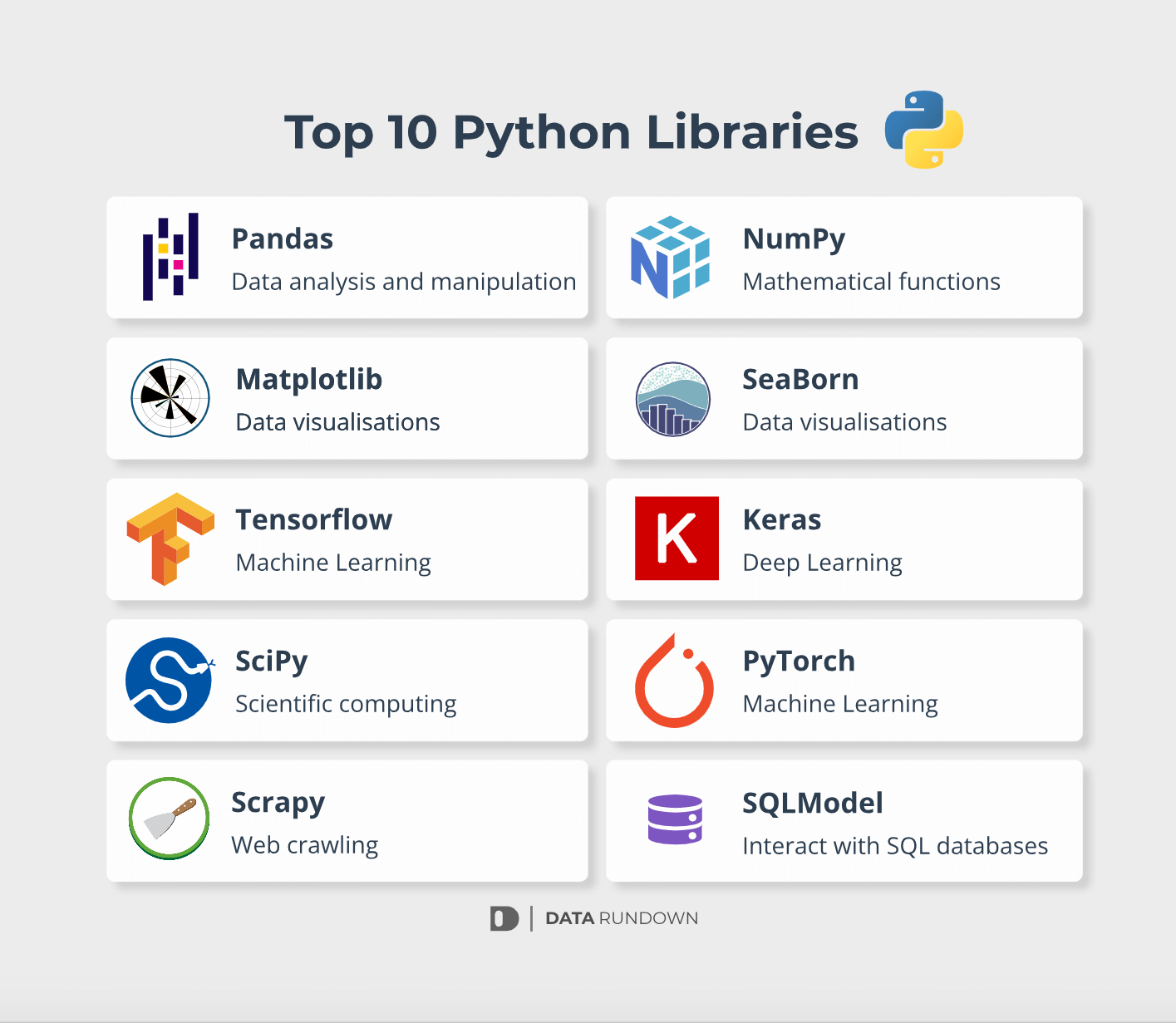
Python’s rich ecosystem of libraries makes it a versatile tool for data analysis, visualization, and machine learning. Here are key libraries you’ll use in this course:
1. Data Manipulation Libraries
pandas: For data manipulation and analysis.- Use it to clean, transform, and analyze tabular data.
- Example:python
import pandas as pd data = {"Name": ["Alice", "Bob"], "Age": [25, 30]} df = pd.DataFrame(data) print(df)
numpy: For numerical computations and array manipulation.- Use it for efficient mathematical operations on large datasets.
- Example:python
import numpy as np arr = np.array([1, 2, 3, 4]) print(np.mean(arr)) # Calculate mean
2. Statistical Analysis Libraries
scipy: Provides advanced statistical functions and optimization tools.- Example:python
from scipy.stats import pearsonr x = [1, 2, 3] y = [2, 4, 6] print(pearsonr(x, y))
- Example:
statsmodels: For more complex statistical modeling.
3. Visualization Libraries
matplotlib: A foundational library for static visualizations.- Example:python
import matplotlib.pyplot as plt x = [1, 2, 3] y = [2, 4, 6] plt.plot(x, y) plt.show()
- Example:
seaborn: Builds on Matplotlib for more aesthetically pleasing plots.
4. Machine Learning Libraries
scikit-learn: For supervised and unsupervised machine learning.tensorflowandpytorch: For deep learning.
5. Web and Data Access Libraries
requests: For making HTTP requests.BeautifulSoup: For web scraping.sqlalchemy: For interacting with databases.
APIs, Databases, and Web Scraping
Modern data analysis often involves gathering data from external sources, such as APIs, databases, or web scraping. These techniques allow you to access, manage, and analyze dynamic datasets efficiently.
APIs (Application Programming Interfaces)
APIs provide a structured way to access data or services hosted on external servers. They enable you to request specific information, such as weather forecasts, stock prices, or social media metrics, without direct access to the database.
How APIs Work:
- You send a request to an API endpoint using HTTP methods like
GETorPOST. - The server processes the request and returns data, often in JSON or XML format.
Python Libraries for APIs:
requests: Simplifies HTTP requests to APIs.json: Parses JSON responses for easy data handling.
Code Example:
Fetching data from a sample API:
pythonimport requests url = "https://api.sampleapis.com/futurama/characters" response = requests.get(url) if response.status_code == 200: data = response.json() # Parse JSON response print(data[:3]) # Display first three results else: print(f"Error: {response.status_code}")
Databases
Databases store structured data that can be queried and updated using SQL (Structured Query Language). Python provides tools to connect to and manage databases like MySQL, PostgreSQL, and SQLite.
Python Libraries for Databases:
sqlite3: Built-in Python library for SQLite.SQLAlchemy: A powerful library for database management and ORM (Object Relational Mapping).
Code Example:
Creating and querying a database using SQLite:
pythonimport sqlite3 # Connect to a database (or create one if it doesn't exist) conn = sqlite3.connect("example.db") cursor = conn.cursor() # Create a table cursor.execute(""" CREATE TABLE IF NOT EXISTS users ( id INTEGER PRIMARY KEY, name TEXT, age INTEGER ) """) # Insert data cursor.execute("INSERT INTO users (name, age) VALUES ('Alice', 25)") conn.commit() # Query data cursor.execute("SELECT * FROM users") rows = cursor.fetchall() print(rows) # Close the connection conn.close()
Web Scraping
Web scraping involves extracting data from websites. This technique is useful when data is not available through APIs or databases but is publicly visible on webpages.
Python Libraries for Web Scraping:
BeautifulSoup: Parses HTML and XML documents.requests: Fetches webpage content.selenium: Automates web browsers for dynamic content scraping.
Code Example:
Scraping titles from a webpage using BeautifulSoup:
pythonfrom bs4 import BeautifulSoup import requests url = "https://example.com" response = requests.get(url) if response.status_code == 200: soup = BeautifulSoup(response.text, "html.parser") titles = soup.find_all("h1") # Find all h1 elements for title in titles: print(title.text) else: print(f"Error: {response.status_code}")
Ethical Considerations
- Permission: Ensure you have permission to scrape or use data.
- Rate Limiting: Avoid overwhelming servers with excessive requests.
- Data Privacy: Respect user privacy and data usage policies.
Web Scraping APIs with Python for Data Science [Video]
Univariate and Bivariate Data Analysis Using Python
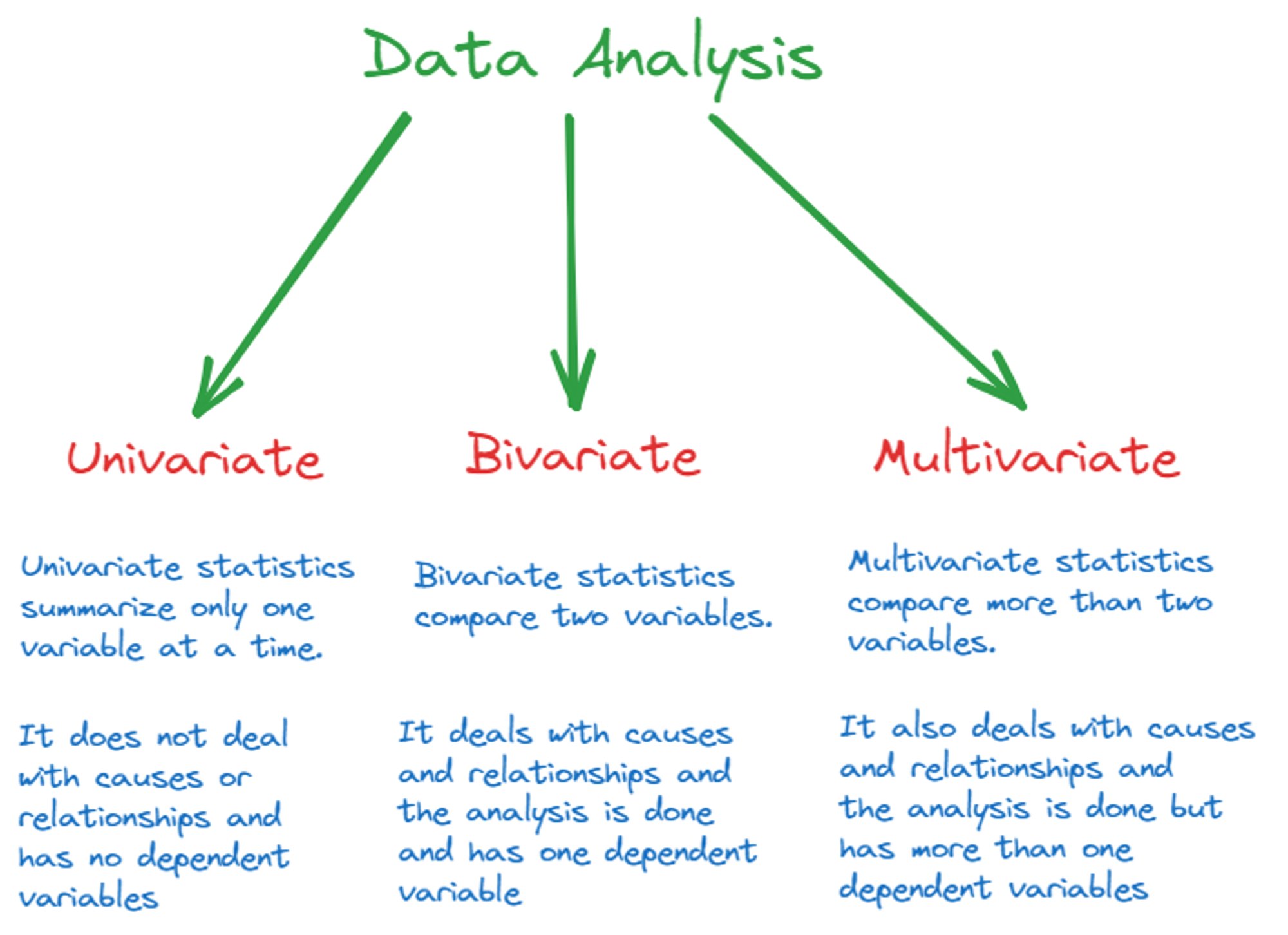
Data analysis begins with understanding individual variables (univariate analysis) and relationships between two variables (bivariate analysis). These foundational techniques provide essential insights that inform more complex analyses. Python, with its robust libraries, offers powerful tools for efficiently performing these types of analyses.
Univariate Data Analysis
Univariate analysis focuses on a single variable to understand its characteristics and distribution. Key aspects include:
- Central Tendency: Measures such as mean, median, and mode summarize the "center" of the data.
- Dispersion: Metrics like range, standard deviation, and variance provide insights into the spread of data.
- Standardization: Calculating z-scores enables comparisons across datasets by measuring how far data points are from the mean in terms of standard deviations.
Python Tools:
- Use the
pandaslibrary to load and manipulate datasets. - Leverage functions like
.mean()and.std()for quick computations. - Utilize
scipy.stats.zscorefor standardization.
Example Use Case:
A researcher analyzing test scores can calculate the mean and standard deviation to identify trends and outliers in student performance.
Bivariate Data Analysis
Bivariate analysis examines the relationship between two variables. This is crucial for exploring correlations, trends, or dependencies. Common methods include:
- Correlation Analysis:
- Pearson Correlation: Measures the linear relationship between two variables, ranging from -1 (perfect negative correlation) to +1 (perfect positive correlation).
- Spearman Correlation: Evaluates monotonic relationships, suitable for ordinal or non-linear data.
- Covariance: Indicates the direction of the relationship but not its strength.
Python Tools:
- Use the
scipy.statslibrary for calculatingpearsonrandspearmanr. - Employ pandas functions to explore variable relationships within dataframes.
Example Use Case:
An educator investigating the relationship between study hours and test scores might calculate Pearson and Spearman correlations to determine if more study time correlates with higher scores.
Case Study Example
Analyzing Relationships with Scatterplots and Heatmaps
Scenario:
Dr. Patel, a data scientist, is analyzing a dataset containing information about student study hours and their corresponding test scores. She wants to visualize the relationship between these variables using a scatterplot and a heatmap to identify patterns and correlations.
Dataset:
The dataset (students.csv) contains the following data:
| Student | Study Hours | Test Score |
|---|---|---|
| Alice | 10 | 88 |
| Bob | 8 | 75 |
| Charlie | 12 | 95 |
| Diana | 7 | 70 |
| Edward | 9 | 85 |
Step 1: Import the Dataset
Dr. Patel starts by importing the dataset into a DataFrame using the pandas library.
Code:
pythonimport pandas as pd # Import the dataset df = pd.read_csv('students.csv') # Display the first few rows of the dataset print(df.head())
Output:
Student Study Hours Test Score 0 Alice 10 88 1 Bob 8 75 2 Charlie 12 95 3 Diana 7 70 4 Edward 9 85
Step 2: Create a Scatterplot
Dr. Patel uses the matplotlib.pyplot library to create a scatterplot to visualize the relationship between study hours and test scores.
Code:
pythonimport matplotlib.pyplot as plt # Scatterplot: Study Hours vs. Test Score plt.figure(figsize=(8, 6)) plt.scatter(df['Study Hours'], df['Test Score'], color='blue', alpha=0.7) plt.title('Scatterplot of Study Hours vs. Test Score') plt.xlabel('Study Hours') plt.ylabel('Test Score') plt.grid(True) plt.show()
Explanation:
plt.scattercreates the scatterplot.- The
alphaparameter makes points semi-transparent for better visualization.
Output (Scatterplot):
The scatterplot shows a clear positive relationship between study hours and test scores.
Step 3: Generate a Heatmap
Next, Dr. Patel computes the correlation matrix for the numerical variables and visualizes it using a heatmap.
Code:
pythonimport seaborn as sns # Calculate correlation matrix correlation_matrix = df[['Study Hours', 'Test Score']].corr() # Heatmap: Correlation matrix plt.figure(figsize=(8, 6)) sns.heatmap(correlation_matrix, annot=True, cmap='coolwarm', fmt=".2f", cbar=True) plt.title('Heatmap of Correlation Matrix') plt.show()
Explanation:
df.corr()computes the Pearson correlation coefficients.sns.heatmapvisualizes the correlation matrix with annotations showing the exact correlation values.
Output (Heatmap):
The heatmap highlights the strong positive correlation () between study hours and test scores.
Step 4: Interpretation
From the visualizations:
- Scatterplot: The trend indicates that students who study more hours tend to achieve higher test scores.
- Heatmap: The strong correlation value confirms this relationship statistically.
Conclusion:
Using scatterplots and heatmaps, Dr. Patel effectively analyzed the relationship between study hours and test scores. These visualizations provide actionable insights, such as emphasizing study time's impact on performance, which can guide academic interventions.
matplotlib.pyplot in the scatterplot example?In Dr. Patel’s case, what does the use of sns.heatmap to visualize the correlation matrix accomplish?
What is Univariate, Bivariate and Multivariate analysis? [video]
Introduction to Calculating Statistical Measures

Statistical measures are essential tools for summarizing data and uncovering patterns. In this section, we explore key measures used in data analysis—mean, median, and correlation—and learn how to calculate them using Python.
Mean
The mean (average) is a measure of central tendency that represents the sum of all values divided by the number of values. It is widely used to understand the "typical" value in a dataset.
Formula:
Where represents each data point, and is the total number of data points.
Python Code Example:
pythonimport pandas as pd data = [10, 20, 30, 40, 50] mean_value = pd.Series(data).mean() print(f"Mean: {mean_value}")
Median
The median is the middle value in a dataset when the values are arranged in ascending order. It is less sensitive to outliers compared to the mean.
Steps to Calculate:
- Sort the data.
- Identify the middle value (or the average of two middle values if the dataset has an even number of elements).
Python Code Example:
pythonmedian_value = pd.Series(data).median() print(f"Median: {median_value}")
Correlation
Correlation measures the strength and direction of the relationship between two variables. Common correlation measures include:
- Pearson Correlation: For linear relationships.
- Spearman Correlation: For monotonic relationships (not necessarily linear).
Formula for Pearson Correlation:
Where is the correlation coefficient, and are the data points, and and are their means.
Python Code Example:
pythonfrom scipy.stats import pearsonr, spearmanr x = [1, 2, 3, 4, 5] y = [2, 4, 6, 8, 10] pearson_corr, _ = pearsonr(x, y) spearman_corr, _ = spearmanr(x, y) print(f"Pearson Correlation: {pearson_corr}") print(f"Spearman Correlation: {spearman_corr}")
Practical Applications
- Mean: Analyzing average performance scores.
- Median: Evaluating income levels to reduce the impact of outliers.
- Correlation: Investigating relationships between study time and grades.
Case Study Example
Working with DataFrames and Calculating Z-Scores
Scenario:
Dr. Smith, an educational researcher, is analyzing test scores from a sample of students to identify which scores significantly deviate from the average. To do this, she decides to calculate the z-scores for each student’s score using Python.
Dataset:
Dr. Smith’s dataset includes the following student scores:
| Student | Test Score |
|---|---|
| Alice | 88 |
| Bob | 92 |
| Charlie | 79 |
| Diana | 95 |
| Edward | 85 |
Step 1: Load Data into a DataFrame
First, Dr. Smith creates a DataFrame using the data.
Code:
pythonimport pandas as pd # Create a dataset data = { "Student": ["Alice", "Bob", "Charlie", "Diana", "Edward"], "Test Score": [88, 92, 79, 95, 85] } # Convert to a DataFrame df = pd.DataFrame(data) # Display the DataFrame print(df)
Output:
Student Test Score 0 Alice 88 1 Bob 92 2 Charlie 79 3 Diana 95 4 Edward 85
Step 2: Calculate the Z-Scores
Dr. Smith calculates z-scores for the test scores to determine how far each score deviates from the mean in terms of standard deviations.
Formula for Z-Score:
Where:
- = Individual score
- = Mean of the scores
- = Standard deviation of the scores
Code:
pythonfrom scipy.stats import zscore # Calculate z-scores df['Z-Score'] = zscore(df['Test Score']) # Display the DataFrame with z-scores print(df)
Output:
Student Test Score Z-Score 0 Alice 88 -0.100856 1 Bob 92 0.755989 2 Charlie 79 -1.613700 3 Diana 95 1.289004 4 Edward 85 -0.330437
Step 3: Interpretation
Dr. Smith uses the z-scores to identify outliers or students with scores significantly above or below the average.
- A z-score of 0 indicates a score equal to the mean.
- A z-score > 2 or < -2 is typically considered an outlier.
Analysis:
- Charlie’s score () is notably below average but not extreme.
- Diana’s score () is significantly above average.
Conclusion:
Using Python, Dr. Smith efficiently calculated z-scores, gaining insights into the distribution of student scores. This process helps her identify students who may require additional support or recognition for exceptional performance.
Why is calculating the z-score useful in data analysis? It allows comparison of data points from different distributions. End of Lesson ReviewCongratulations on completing this lesson! You have learned valuable skills in data analysis using Python, including calculating z-scores, creating scatterplots, and generating heatmaps. These techniques are crucial for understanding the relationships within your data and identifying key trends. Key Takeaways:
Next Steps:Before moving forward, remember that you must complete the following tasks by the module deadline:
|

Comments
Post a Comment